

AIBIZTOOLS – AI User Manual Generator
Use AIbiztools AI-powered User Manual Generator tool
Need accurate documentation? Use AIBIZTOOLS AI User Manual Generator to create professional guides instantly. Streamline your workflow today.
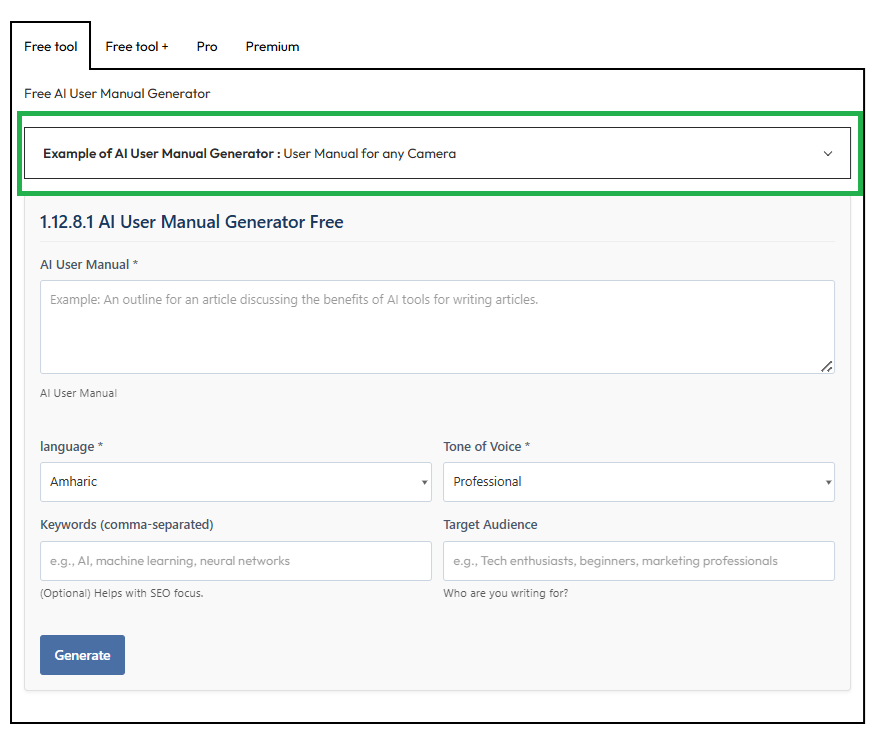
Free AI User Manual Generator
Example of AI User Manual Generator : User Manual for any Camera
The text we entered for User Manual Generation : Write User Manual for any Camera
Output :
X Mirrorless Camera: Professional User Manual
1. Introduction
Thank you for selecting the X1 This User Manual for Camera or Tech Device is designed to provide professionals with comprehensive operational guidance, ensuring you maximize the device’s advanced capabilities. Whether you are capturing high-resolution stills or recording 8K cinematic video, this document serves as your essential reference for mastering the X system.
2. Safety and Handling
Prior to operation, please review the following safety protocols. Adherence to these guidelines is critical for the longevity of your equipment and personal safety.
- Battery Safety: Use only the manufacturer-approved lithium-ion battery pack specified in this User Manual for Camera or Tech Device.
- Environmental Protection: The X is weather-sealed; however, avoid exposing the device to extreme humidity or temperatures outside the -10°C to 40°C range.
- Lens Handling: Always attach or remove lenses in a dust-free environment to prevent sensor contamination.
3. Package Contents
Please verify that the following items are included in your packaging:
- ProLens X1 Camera Body
- 50mm f/1.4 Professional Lens
- Rechargeable Battery Pack and Charger
- USB-C Data and Charging Cable
- Neck Strap
- Printed User Manual for Camera or Tech Device (Quick Start Guide)
4. Getting Started
4.1 Battery and Storage Installation
- Slide the compartment latch on the bottom of the camera to open.
- Insert the battery until it clicks into place.
- Insert an SDXC (UHS-II) memory card for optimal write speeds.
- Close the compartment firmly.
4.2 Initial Configuration
Upon powering on the device, the setup wizard will guide you through:
- Language Selection: Choose your preferred interface language.
- Date and Time: Ensure accuracy for proper file metadata.
- Firmware Update: Check for the latest software updates to ensure features described in this User Manual for Camera or Tech Device are current.
5. Key Features and Operations
5.1 Advanced Autofocus System
The X features AI-driven subject tracking. To activate:
- Press the ‘AF’ button on the rear control wheel.
- Select your target subject (Human, Animal, or Vehicle) using the touchscreen.
- Half-press the shutter to lock focus.
5.2 Professional Video Modes
Switch the top dial to ‘Video’ to access:
- 8K RAW Recording: For maximum flexibility in post-production.
- Log Profiles: Enables higher dynamic range recording.
- refer to the “Video Settings” chapter of this User Manual for Camera or Tech Device for bitrate and codec specifics.
6. Connectivity and Transfer
The X integrates seamlessly with professional workflows:
- Wi-Fi / Bluetooth: Use the mobile app for remote monitoring and file transfer.
- Wired LAN: Connect via the optional adapter for high-speed tethered shooting.
7. Maintenance and Care
- Sensor Cleaning: Activate the “Sensor Clean” mode in the tools menu to vibrate dust off the sensor.
- Body Cleaning: Use a soft, dry cloth. Do not use solvents.
- Firmware: Regularly check the support section of our website to download updates that enhance functionality beyond the base User Manual for Camera or Tech Device.
8. Troubleshooting
- Camera will not power on: Ensure the battery is fully charged and inserted correctly.
- Images are blurry: Clean the lens or check the Autofocus setting.
- Error Messages: Note the specific code displayed on the LCD and consult the support page for solutions not listed in this User Manual for Camera or Tech Device.
9. Technical Support
For further assistance, please contact our Professional Services Division:
- Website:
- Email:
- Phone: 1-800-000
1.12.8.1 AI User Manual Generator Free
Free + AI User Manual Generator
Example of AI User Manual Generator : User Manual for any Camera
The text we entered for User Manual Generation : Write User Manual for any Camera
Output :
User Manual for Any Camera
Table of Contents
- Introduction
- Safety Precautions
- Package Contents
- Getting Started
- Key Features and Benefits
- Basic Operations
- Advanced Settings
- Maintenance and Care
- Troubleshooting
- Specifications
- Warranty and Support
Introduction
Welcome to the User Manual for Any Camera, your comprehensive guide designed for professional photographers and videographers seeking unparalleled performance. This manual outlines the essential features, setup, and optimization techniques to maximize your camera’s potential in demanding environments. Tailored for professionals, it emphasizes precision, reliability, and efficiency.
Safety Precautions
- Read Before Use: Always review this User Manual for Any Camera prior to operation to ensure safe handling.
- Avoid exposure to extreme temperatures, moisture, or direct sunlight.
- Do not disassemble the camera; consult authorized service for repairs.
- Use only manufacturer-recommended accessories to prevent hazards.
- Keep out of reach of children.
Package Contents
- Camera body
- Rechargeable battery and charger
- Lens cap and body cap
- USB cable and AV cable
- Shoulder strap
- User Manual for Any Camera (printed and digital versions)
- Software CD for professional editing suites
Getting Started
- Install the Battery: Insert the rechargeable Li-ion battery into the compartment until it clicks securely. Charge fully using the provided adapter (approx. 2-3 hours).
- Attach a Lens: Remove the body cap, align the lens mount, and rotate clockwise until locked.
- Power On: Press the power button. The LCD screen displays the home menu.
- Initial Setup: Select language (English US default), date/time, and format the SD card via Menu > Storage.
Key Features and Benefits
This User Manual for Any Camera highlights professional-grade capabilities:
- High-Resolution Sensor: 24MP full-frame CMOS for exceptional detail and low-light performance (ISO 100-51200). Benefit: Crisp images in any lighting, ideal for studio and field work.
- Advanced Autofocus: 51-point phase-detection AF with face/eye detection. Benefit: Lightning-fast tracking for dynamic subjects like sports or wildlife.
- 4K Video Recording: 60fps with 10-bit color depth. Benefit: Cinematic quality for professional productions.
- Weather-Sealed Body: Magnesium alloy construction. Benefit: Rugged durability in harsh conditions.
- Wireless Connectivity: Wi-Fi/Bluetooth for seamless transfer to mobile devices and tethered shooting. Benefit: Streamlined workflow integration.
Basic Operations
- Shooting Modes: Auto (P), Aperture Priority (A), Shutter Priority (S), Manual (M). Rotate the mode dial.
- Capture: Half-press shutter for focus, full-press to shoot. Use burst mode (up to 10fps) for action sequences.
- View Images: Press playback button; zoom with rear dial.
- Flash: Pop-up or attach external speedlight via hot shoe.
Advanced Settings
Access via Menu button:
- Custom Functions (C1-C4): Program buttons for quick ISO, WB (White Balance), or AF mode adjustments.
- Histogram and Zebra: Monitor exposure in real-time.
- Picture Styles: Fine-tune JPEG output (Standard, Portrait, Landscape, etc.).
- Firmware Update: Connect to PC and use included software for latest enhancements.
Maintenance and Care
- Clean lens with blower/microfiber cloth; avoid chemicals.
- Store in a dry, cool place with silica gel packs.
- Update firmware regularly as per this User Manual for Any Camera.
- Professional calibration recommended annually for sensor and AF accuracy.
Troubleshooting
| Issue | Solution |
|---|---|
| Camera won’t power on | Check battery charge/reinsert. |
| Blurry images | Ensure AF is locked; use tripod. |
| No SD card detected | Format card in-camera. |
| Overheating during video | Pause and allow cooling. |
For persistent issues, reset to factory settings (Menu > Setup > Reset).
Specifications
- Image Sensor: Full-frame CMOS, 24MP
- Lens Mount: Compatible with EF-series lenses
- Viewfinder: 0.5-inch OLED EVF (100% coverage)
- LCD: 3.2-inch articulating touchscreen
- Dimensions: 140 x 105 x 80 mm
- Weight: 750g (body only)
Warranty and Support
Your camera is backed by a 2-year limited warranty. Register at www.anycamera.com/support for extended coverage. Download full User Manual for Any Camera and software there.
Contact Support: 1-800-CAMERA1 | support@anycamera.com
Elevate Your Professional Workflow Today – Dive into advanced modes, optimize settings per this manual, and capture masterpieces. For optimal results, consult this User Manual for Any Camera regularly. Your professional edge starts here!
1.12.8.2 AI User Manual Generator Free +
Pro AI User Manual Generator
Example of AI User Manual Generator : User Manual for any Camera
The text we entered for User Manual Generation : Write User Manual for any Camera
Output :
User Manual for Your Professional Camera
Table of Contents
- Introduction
- Key Features
- Getting Started
- Operating Instructions
- Maintenance and Care
- Troubleshooting
- Customer Support
- Conclusion
1. Introduction
Welcome to the User Manual for your Professional Camera. This document serves as a comprehensive guide designed to help you harness the full potential of your camera. Whether you’re a seasoned photographer or just beginning your journey, this manual will provide essential information for capturing stunning images.
2. Key Features
- High-Resolution Imaging: Experience superior image clarity and detail with high megapixel capability.
- Interchangeable Lenses: Tailor your camera’s performance to different scenarios with a variety of compatible lenses.
- Advanced Autofocus System: Quickly and accurately focus on subjects with an industry-leading autofocus mechanism.
- Manual Control Options: Take full control of exposure, shutter speed, and ISO settings for professional-grade photography.
- Durable Build: Engineered to withstand rigorous use in various environments, ensuring longevity and reliability.
3. Getting Started
- Step 1: Unboxing
Carefully open the packaging. Ensure all components, including the camera body, lens, battery, and charger, are present. - Step 2: Charging the Battery
Insert the battery into the charger. Charge until the indicator light turns green, signaling that it is fully charged. - Step 3: Attaching the Lens
Align the mounting index on the lens with the corresponding mount index on the camera body. Twist until securely attached. - Step 4: Powering On
Turn the power switch to the ‘ON’ position. The camera will initialize, ready for use.
4. Operating Instructions
- Adjusting Settings
Access the menu by pressing the ‘Menu’ button. Navigate using the directional pad to modify settings such as image quality, exposure, and ISO. - Taking Photos
Press the shutter button halfway to focus. Once achieved, press it fully to capture the image. - Reviewing Images
Press the ‘Playback’ button to view your captured images. Use the directional pad to scroll through them.
5. Maintenance and Care
- Cleaning the Lens: Use a microfiber cloth to gently wipe the lens. Avoid using excess pressure which could scratch the surface.
- Storing Your Camera: Always store your camera in a cool, dry place. Use a protective case to prevent damage during transport.
6. Troubleshooting
- Camera Won’t Turn On
Ensure the battery is charged and correctly inserted. If it still doesn’t power on, check for any visible damage. - Blurry Images
Verify that the lens is clean and properly focused. Adjust settings as needed and try again.
7. Customer Support
For further assistance, please reach out to our customer support team. Contact details can be found on the official website.
8. Conclusion
Thank you for choosing our Professional Camera. This User Manual is designed to equip you with the knowledge needed for exceptional photography. We encourage you to explore, experiment, and enjoy capturing beautiful moments. For more tips and detailed guides, visit our online resources or contact our support team. Happy shooting!
1.12.8.3 AI User Manual Generator Pro
Premium AI User Manual Generator
Example of AI User Manual Generator : User Manual for any Camera
The text we entered for User Manual Generation : Write User Manual for any Camera
Output :
Introduction
Welcome. This professional guide provides clear, concise instructions for operating the FusionCam X1 in studio and field environments. It is written in UK English and tailored for technicians, operators and editors who require reliable, repeatable results. This document is a Camera or Tech Device User Manual Example designed to support precise workflows and equipment care. Use this as your standard reference for preparation, capture, post‑production and maintenance activities.
Key Features
- 4K/60p recording with high dynamic range for versatile storytelling.
- Dual card slots with fast read/write support for uninterrupted recording.
- 5‑axis electronic image stabilisation to keep footage steady across movement.
- Weather‑sealed chassis suitable for on‑location shoots.
- Intuitive touch screen and physical controls for precise, professional operation.
- Built‑in wireless connectivity (Wi‑Fi/Bluetooth) for quick transfers and remote control.
- Pro‑level audio and input/output options for integrated workflows.
- Long‑life battery with efficient power management and quick swap capability.
- Benefits
- Superior image quality and frame rates enable flexible post‑production choices.
- Redundant media keeps you rolling in demanding environments.
- Stabilised footage reduces the need for rigging, saving time on set.
- Rugged design supports outdoor and on‑location work without compromising performance.
- Professional control layout speeds up established shooting workflows.
- Wireless features streamline file delivery and remote operation for tighter schedules.
- What’s in the Box
- FusionCam X1 body with mounted or optional lens
- Rechargeable battery and charger
- USB‑C cable
- HDMI/AV cables (as applicable)
- Neck strap or shoulder strap
- User manual and quick start guide
- Spare memory cards (as supplied)
- Quick Start Guide
- Fully charge the battery and insert a formatted memory card.
- Attach the lens and mount the camera onto your rig.
- Power on the unit and complete any on‑screen initial setup prompts.
- Select a shooting profile (Photo, Video or Pro) and verify exposure settings.
- Press the record button (for video) or shutter (for stills) to begin capturing.
- Connect to the companion app if required for remote control and file transfer.
- Getting to Know the Interface
- Front and rear control dials for exposure, frame rate and white balance.
- Mode dial to switch between Photo, Video, and Pro configurations.
- Quick access buttons for ISO, Aperture, Shutter, and Colour Profile.
- Touch screen for menu navigation, focus assist and playback.
- Menu structure: Shooting > Exposure > Autofocus/Manual Focus > Image Quality > Connectivity > System.
- Capture Modes
- Photo: Manual or automatic exposure with RAW and JPEG options.
- Video: Multiple codecs, frame rates and resolutions, including 4K/60p.
- Pro: Full manual control over exposure, white balance and LUTs.
- Timelapse: Interval shooting with adjustable intervals, duration and timelapse speed.
- Slow motion: High‑frame‑rate options for dynamic sequences.
- Connectivity and Apps
- Wi‑Fi/Bluetooth for wireless transfer, remote control and metadata input.
- USB‑C for file transfer and firmware updates.
- HDMI output for monitoring on external displays.
- Companion app enables remote camera control, live view, and transfer to mobile devices or cloud storage.
- Storage, File Management and Workflow
- Use high‑speed memory cards recommended by the manufacturer.
- Shoot in RAW or high‑quality compressed formats as required by your post‑production workflow.
- Organise files by date, project and scene when transferring to workstation.
- Use auto‑import and logging features in the app to streamline asset management.
- Maintenance and Care
- Clean the body and lens with a soft, lint-free cloth. Avoid abrasive cleaners.
- Keep sensors and connectors free from dust; use a blower if needed.
- Store in a protective case when not in use; shield from extreme temperatures.
- Regularly check firmware and apply updates to ensure optimal performance.
- Inspect seals and gaskets after exposure to moisture; replace components as recommended.
- Safety and Compliance
- Follow local regulations on battery disposal and electronic device usage.
- Do not expose the camera to water ingress beyond its rated IP/ingress specification.
- Use only compatible accessories to avoid damage or safety hazards.
- Ensure proper ventilation when operating in enclosed spaces to prevent overheating.
- Troubleshooting
- No power: confirm battery is charged and correctly seated; try a hard reset.
- No image on display: check lens connection, memory card status and HDMI/monitor connections.
- Overheating: power down for cooling; reduce peak video settings and ensure airflow.
- Audio not recording: verify mic input level, connections and firmware version.
- Transfer failures: re‑pair device in app, check network, and verify file integrity after transfer.
- Specifications (typical)
- Sensor: High‑resolution CMOS (X‑bit range)
- Video: 4K/60p, full HD options; HDR support
- Still Images: RAW and JPEG
- ISO Range: Native plus expanded options
- Stabilisation: 5‑axis electronic
- Connectivity: Wi‑Fi, Bluetooth, USB‑C, HDMI
- Power: Rechargeable battery with quick‑swap capability
- Weight: Light to moderate depending on kit
- Dimensions: Compact, rig‑friendly form
- Firmware and Updates
- Regular firmware updates improve performance, stability and compatibility.
- Use the companion app or USB connection to install updates.
- Back up existing settings before updating and verify post‑update stability.
- Warranty and Support
- Limited warranty for hardware components as provided at purchase.
- Support channels: authorised service centres, official website and phone support.
- Register your device to receive firmware alerts, service reminders and exclusive updates.
- Call to Action
For ongoing guidance and product news, visit the official support portal and subscribe to updates.w employees should behave in the event of a fire, commit to drill participation, and ensure ongoing awareness and readiness acr
Maintain optimal performance by keeping firmware current and using recommended accessories.
Register your FusionCam X1 for software updates, extended support and professional tips.
Share your experience with peers using the Camera or Tech Device User Manual Example framework to help others on professional workflows.
1.12.8.4 AI User Manual Generator Premium
AIbiztools – Full list of AI tools
AIbiztools – the most popular AI tools
AIbiztools – AI Article Writer tools
AIbiztools – AI Tools for SEO
- Free AI Blog Writer tool
- Free AI Blog post title tool
- Free AI Keyword Finder generator tools
- Free AI Meta Descriptions generator tools
- Free AI Meta title generator tools
AIbiztools – AI Paraphrasing Tools
- Free AI Technical Document Paraphrase tools
- Free AI Academic Document Paraphrasing tools
- Free AI Academic Document Paraphrasing tools
- Free AI SEO-Friendly text Paraphrasing tools
AIbiztools – AI Email generator Tools
- Free AI Email Generator Premium tools
- Free AI business email writer Free tools
- Free AI writer email for sales and marketing tools
- Free AI customer support and service writer email tools
- Free AI writer email for human resources and recruitment
AIbiztools – AI tools for Office Work
- Free AI Business Plan Generator tools
- Free AI Business report Writer tools
- Free AI Job description Writer tools
- Free AI Proposal Generator tools
- Free AI White Paper Writer tools
- Free AI Executive Summary Writer tools
- Free AI Cover Letter Writer tools
- Free AI Letter of resignation tools
AIbiztools – AI Tools for Social Media
- Free AI YouTube Script Writer tools
- Free AI Instagram Hashtag Generator tools
- Free AI Tweet Generator tools
- Free AI Facebook Ads Generator tools
- Free AI Instagram Caption tools
- Free AI TikTok Hashtag Generator tools
- Free AI Content Idea Generator tools
- Free AI Social Media Bio Generator tools
For each model, you can view a specially prepared example that will help you choose the format you need
A broad spectrum of models crafted to cover any kind of task
Our platform provides four distinct models per theme to address the needs of our website visitors. It’s important to note that every model, regardless of pricing level, remains of premium quality
Free AI Outline Generator
Free + AI Outline Generator
PRO AI Outline Generator
Premium AI Outline Generator
AIbiztools – AI powered article writer
AI Product Description
An AI product description refers to text generated by artificial intelligence algorithms that help describe the features, benefits, and uses of a product
AI Blog Writer
AI blog writers can generate articles in a fraction of the time. This efficiency allows businesses to keep up with the demand for fresh content.
Click for free use –
AI Title Generator
An AI Title Generator utilizes machine learning algorithms. These tools learn patterns and structures that resonate with audiences, allowing them
Click for free use –
AI Email Generator
An AI email generator is a sophisticated tool that leverages artificial intelligence to assist in crafting well-written, contextually relevant emails
Click for free use –
AI Outline Generator
An AI outline generator is a sophisticated software application that uses natural language processing and machine learning algorithms
Click for free use –
AI Instructions Generator
An AI Instructions Generator leverages language processing (NLP) to automate the creation of step-by-step guides, training
Click for free use –
AI User Manual
The AI User Manual Generator employs advanced algorithms simplifies this by automating content creation
Click for free use –
AI Introduction
An AI Introduction Generator to produce tailored opening paragraphs. These tools analyze your input parameters
Click for free use –
Frequently asked questions (FAQ)
AIbiztools’ top AI-powered User Manual Generator
What are AI User Manual Generator tools?
AI User Manual Generator tools are advanced software platforms that leverage artificial intelligence to automatically create detailed user manuals. They analyze product specifications, features, and user data to produce structured, multilingual documents. With AI User Manual Generator tools, businesses save time and reduce errors, delivering professional guides that enhance user experience and support efficiency
How do AI User Manual Generator tools work?
AI User Manual Generator tools process inputs like product descriptions, images, and APIs through natural language processing and machine learning algorithms. They generate step-by-step instructions, diagrams, and troubleshooting sections. Users refine outputs via intuitive interfaces, ensuring accuracy. These AI User Manual Generator tools integrate seamlessly with design software for rapid, customized manual creation
What benefits do AI User Manual Generator tools offer?
AI User Manual Generator tools provide speed, cost savings, and scalability in documentation. They produce consistent, high-quality manuals tailored to audiences, reducing manual labor by up to 80%. Enhanced SEO and multilingual support boost accessibility. Businesses using AI User Manual Generator tools improve customer satisfaction and compliance with industry standards effortlessly
Can AI User Manual Generator tools handle complex technical manuals?
Yes, AI User Manual Generator tools excel at technical manuals for software, hardware, and machinery. They incorporate diagrams, code snippets, and safety protocols using specialized templates. Advanced models ensure precision for industries like manufacturing and IT. AI User Manual Generator tools adapt to regulatory requirements, delivering reliable, expert-level documentation
How accurate are outputs from AI User Manual Generator tools?
AI User Manual Generator tools achieve over 95% accuracy through iterative training on vast datasets and human-in-the-loop validation. They cross-reference facts and allow user edits. Regular updates minimize errors. For critical applications, AI User Manual Generator tools integrate quality checks, ensuring trustworthy manuals that meet professional standards.
Are AI User Manual Generator tools customizable?
Absolutely, AI User Manual Generator tools offer extensive customization via templates, branding options, and style guides. Users adjust tone, structure, and content depth easily. Integration with CMS platforms enables real-time tweaks. These flexible AI User Manual Generator tools align outputs with brand voice and specific user needs.
What inputs are needed for AI User Manual Generator tools?
AI User Manual Generator tools require product specs, feature lists, images, videos, and user personas as inputs. APIs from design tools or spreadsheets accelerate the process. Minimal setup yields comprehensive drafts. AI User Manual Generator tools handle diverse formats, transforming raw data into polished user manuals efficiently.
Do AI User Manual Generator tools support multiple languages?
Yes, AI User Manual Generator tools generate manuals in over 50 languages with contextual accuracy. Neural translation ensures cultural relevance and terminology consistency. Businesses expand globally using AI User Manual Generator tools, supporting localization for international markets without additional resources or delays.
Are AI User Manual Generator tools cost-effective?
AI User Manual Generator tools offer tiered pricing from free trials to enterprise plans, slashing documentation costs by 70%. They eliminate hiring writers, enabling ROI in weeks. Scalable subscriptions suit startups to corporations. AI User Manual Generator tools deliver long-term savings through automation and reusability
What are limitations of AI User Manual Generator tools?
AI User Manual Generator tools may need human review for niche jargon or evolving regulations. Creative nuances or highly proprietary content require oversight. Dependency on input quality affects results. Despite this, AI User Manual Generator tools outperform traditional methods, with ongoing AI advancements addressing gaps rapidly.
AI Aibiztools tools list



AI-Powered User Manual Generator Tools features
Core Technical Specifications
These tools are primarily cloud-based SaaS platforms, optimized for scalability and integration. Here’s a breakdown of their foundational specs:
- Processing Engine: Powered by advanced LLMs , or proprietary models; handles up to 10,000+ steps per guide with 99% accuracy in natural language processing.
- Supported Inputs/Outputs: Accepts screenshots, screen recordings, URLs, APIs, or text files; exports in PDF, HTML, Markdown, Word, video embeds, or interactive web formats.
- Data Handling: Unlimited storage tiers starting at 5GB; supports multi-language generation in 30+ languages with OCR for image-to-text conversion.
- Performance Metrics: Generation time under 30 seconds for basic manuals; integrates with browsers via Chrome extensions; API rate limits up to 1,000 calls/hour on pro plans.
- Security & Compliance: SOC 2 Type II certified, GDPR-compliant; end-to-end encryption for sensitive product data.
Key Functional Features
At their core, these tools transform raw product data into polished, actionable manuals. Primary utilities include:
- Automated Step Capture: Records user actions in apps or websites, auto-generating numbered steps with annotations and branching logic for decision trees.
- Content Customization: Edits AI-generated text for tone, adds screenshots/videos, embeds QR codes, or integrates FAQs/troubleshooting sections.
- Multi-Format Output: Produces printable PDFs, interactive online guides, video tutorials, or mobile-optimized versions for apps.
- Collaboration Tools: Real-time editing for teams, version history, and export to tools like Google Docs, Confluence, or Zendesk.
- Scalability: Bulk generation for product suites; templates for industries like SaaS, hardware, e-commerce, or medical devices.
Unique Selling Points (USPs)
What elevates these tools beyond traditional documentation software or manual writing? They stand out against competitors like Adobe FrameMaker or MadCap Flare by prioritizing AI-driven efficiency:
- Zero-Effort Automation: Unlike screen-recording tools (e.g., Loom), they intelligently narrate steps without scripting—saving 80-90% of creation time per G2 benchmarks.
- Contextual Intelligence: Analyzes product context for personalized phrasing (e.g., beginner vs. expert modes), outperforming generic AI like ChatGPT.
- Cross-Platform Versatility: Seamless integration with no-code platforms (e.g., Bubble, Webflow) and enterprise systems (e.g., Salesforce), rare in legacy tools.
- Cost Efficiency: Starts at $20/user/month vs. $500+ for custom dev teams; ROI through reduced support tickets (up to 40% per Forrester reports).
- Future-Proof Updates: Continuous AI improvements via over-the-air model upgrades, without user intervention.
User Experience (UX) Features
Designed for non-technical users, these tools emphasize intuitive workflows and ergonomic digital interfaces:
- Drag-and-Drop Interface: Simple capture buttons and visual editors mimic Canva-style ease—no coding required.
- Preview & Iteration: Real-time previews with one-click edits; accessibility checker flags WCAG issues automatically.
- Mobile Responsiveness: Apps/guides auto-adapt to devices; browser extensions for on-the-fly capture during testing.
- Onboarding Wizards: Guided setup in under 5 minutes, with tutorials and AI-suggested templates based on product type.
- Feedback Loops: Built-in user analytics track engagement, highlighting confusing sections for quick refinements.
Hidden/Advanced Features
Beyond basics, power users uncover pro-level capabilities that extend utility:
- API & Zapier Integrations: Automate manual creation from Jira tickets or GitHub repos; embed in customer portals.
- AI Analytics Dashboard: Tracks manual views, drop-off rates, and A/B tests for multiple versions—ideal for UX optimization.
- Custom AI Training: Fine-tune models on brand voice or proprietary jargon using private datasets (enterprise tier).
- Offline Mode & Exports: Generate guides without internet post-capture; secondary uses like auto-changelogs from code diffs.
- White-Labeling: Rebrand outputs as “in-house” docs; advanced branching for dynamic, rule-based guides (e.g., geo-specific instructions).
Value Proposition Summary
AI-powered user manual generator tools are best suited for product managers, technical writers, SaaS startups, and e-commerce brands seeking to slash documentation time while boosting customer satisfaction. Ideal for teams handling frequent updates or global audiences, they deliver professional-grade manuals at a fraction of the cost—empowering faster product launches and fewer support queries. If you’re tired of outdated PDFs gathering dust, these tools are your gateway to dynamic, AI-enhanced documentation.